Organisation Details: Profile, Contact and Public Identity
Overview
Your organisation details form the foundation of your presence on Seaty. This information appears on your public organisation page, event pages, order confirmations, and invoices. Getting it right helps customers find you, contact you, and trust your events.
At its simplest, Organisation Details answers one question: Who are you, and how can people reach you?
Who uses this: Organisation administrators and owners.
Key capabilities:
- Set your organisation name and unique web address (tag)
- Add your physical address for administrative records
- Configure box office contact details visible to customers
- Add links to your social media profiles
- Write a compelling public description of your organisation
Looking for Facebook Pixel or the mailing list toggle? Those settings now live in the dedicated Organisation Marketing section of the editor.
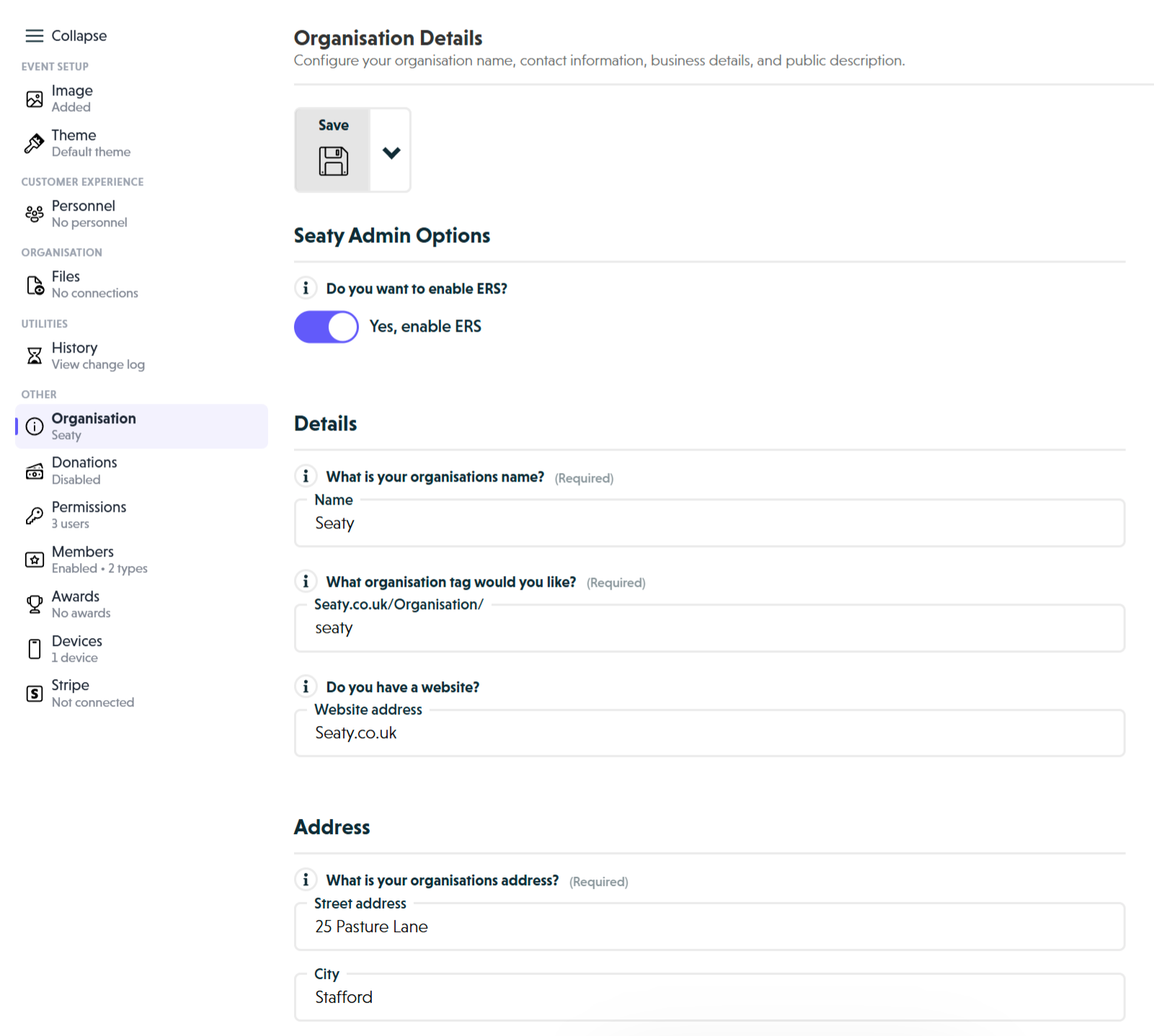 Organisation Details overview showing Seaty Admin Options, Details section with name, tag, and website fields, and Address section
How It Works
At a glance: Setting up organisation details is a straightforward process of entering your core information and saving it.
1. Enter your identity information
Start with your organisation name and tag. The name is how customers see you throughout the platform. The tag creates your unique web address that you can share in marketing materials.
2. Provide your address
Enter your business address for administrative purposes. This information is used for invoicing and internal records, not displayed to customers.
3. Set up contact details
Add your box office email and phone number. These appear on event pages so customers can reach you with questions about tickets, accessibility, or group bookings.
4. Describe your organisation
Write a compelling description that tells customers who you are, what you do, and why they should attend your events. This appears on your public organisation page.
5. Save your changes
Review your information and save. All sections save together, so you can make multiple changes before saving once.
Think of it this way:
- Organisation name is your public identity across the platform
- Organisation tag is your unique web address for marketing
- Contact details are how customers reach you directly
- Description is your opportunity to build trust and interest
Details
Organisation Name
What is your organisation's name?
This is how your organisation appears throughout Seaty - on your organisation page, event pages, order confirmations, and invoices.
Requirements:
- Must be longer than 2 characters
- Maximum 100 characters
- Required field
Best practices:
- Use your official registered organisation name
- Include legal entity type if appropriate (Theatre Company, Community Group, etc.)
- Keep it clear and professional
- Avoid abbreviations unless widely recognised
Examples:
- "Richmond Theatre Company"
- "Manchester Community Arts Centre"
- "The Phoenix Players"
- "St Mary's School"
Where it appears:
- Organisation landing page header
- Event pages (as event organiser)
- Order confirmation emails
- Invoices and receipts
- Search results
Validation: The save button will be disabled if the organisation name is too short (≤2 characters).
Organisation Tag
What organisation tag would you like?
Your organisation tag creates your custom Seaty URL that anyone can use to access your organisation:
seaty.co.uk/Organisation/your-tag
Requirements:
- Must be longer than 2 characters
- Maximum 22 characters
- Must be unique across all of Seaty
- Cannot contain special characters or spaces
- Use plain text only (a-z, 0-9, hyphens recommended)
- Required field
Best practices:
- Use lowercase for consistency
- Use hyphens to separate words
- Make it memorable and easy to say verbally
- Keep it short for easier sharing on marketing materials
- Match your organisation name where possible
- Avoid numbers unless necessary for disambiguation
Examples:
richmond-theatremanchester-artsphoenix-playersst-marys-school
Validation: The save button will be disabled if:
- The tag is too short (≤2 characters)
- The tag contains special characters
- The tag is already in use by another organisation
Where it appears:
- Your organisation's public URL
- Marketing materials and promotional content
- Social media sharing links
- Email signatures
Note: Choose carefully. Your organisation tag becomes part of your brand identity and may be printed on marketing materials. Changing it later will break any existing links.
Website Address
Do you have a website?
Add your organisation's website URL if you have one. This helps customers find more information about your organisation beyond Seaty.
Requirements:
- Optional field
- Maximum 500 characters
- Should be a complete URL (including
https://)
Best practices:
- Include the full URL:
https://www.yourorganisation.co.uk - Ensure the website is active and up-to-date
- Link to your main homepage or events page
- Update if your website URL changes
Where it appears:
- Organisation landing page
- Order confirmation emails
- Event pages (as a link to learn more about the organiser)
Example:
https://www.richmondtheatre.co.uk
Address
What is your organisation's address?
Provide your organisation's official business address. This information is used for invoicing and administrative purposes.
Street Address
Requirements:
- Maximum 100 characters
- Required field
What to include:
- Building number and street name
- Unit or suite number if applicable
Examples:
- "123 High Street"
- "The Theatre Building, 45 King's Road"
- "Unit 5, Riverside Business Park"
Validation: The save button will be disabled if the street address is too short (≤2 characters).
City
Requirements:
- Maximum 100 characters
- Required field
What to include:
- Town or city name
- Can include county if needed for clarity
Examples:
- "Richmond"
- "Manchester"
- "St Albans, Hertfordshire"
Validation: The save button will be disabled if the city is too short (≤2 characters).
Postcode
Requirements:
- Maximum 100 characters
- Must be longer than 4 characters
- Required field
Format:
- Use standard UK postcode format
- Include the space between outward and inward codes
Examples:
- "SW1A 1AA"
- "M1 1AE"
- "EH1 1YZ"
Validation: The save button will be disabled if the postcode is too short (≤4 characters).
Privacy Note
Note: Your address details are not displayed to customers. They are used for administrative purposes, invoicing, and internal records only. Customers do not see your full address on event pages or in emails.
Contact
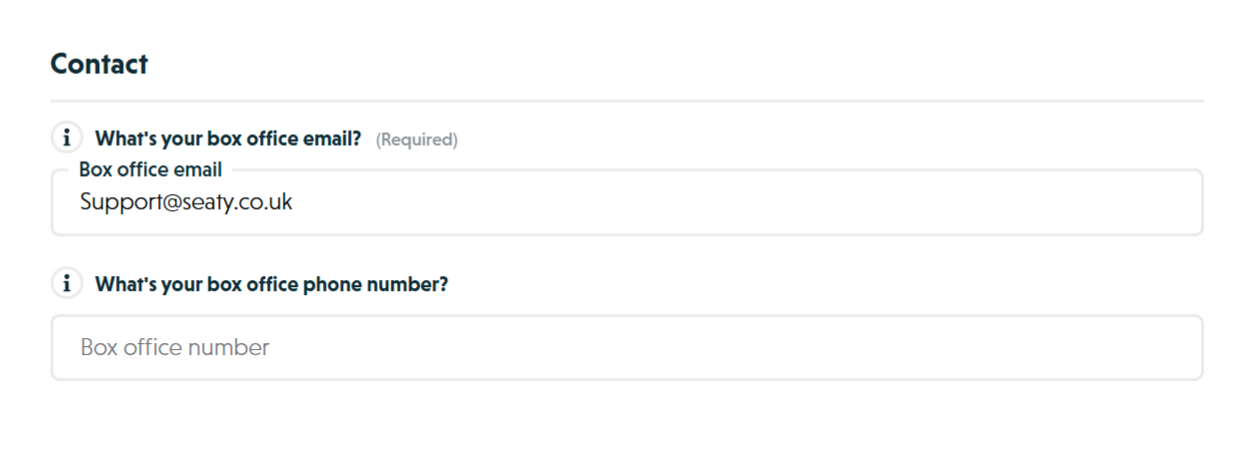 Contact section showing box office email and phone fields, and About your organisation section with rich text editor
Provide contact details that customers can use to reach your box office with enquiries, support requests, or phone bookings.
Box Office Email
What's your box office email?
This is the primary email address customers use to contact you about events, tickets, and support.
Requirements:
- Maximum 200 characters
- Must be a valid email address format
- Required field
Best practices:
- Use a dedicated box office or events email:
boxoffice@yourorg.co.uk - Avoid personal email addresses
- Ensure the inbox is monitored regularly
- Set up an auto-responder for acknowledgement
- Use a professional, customer-facing address
Examples:
boxoffice@richmondtheatre.co.uktickets@manchesterarts.orgevents@stmarysschool.edu
Where it appears:
- Event pages (visible to all customers)
- Order confirmation emails
- Customer support information
- Refund and query correspondence
Validation: The save button will be disabled if the email address is invalid or missing.
Note: This email address is visible to the public on your event pages. Make sure it's monitored and customer enquiries are answered promptly.
Box Office Phone Number
What's your box office phone number?
Provide a contact number that customers can call to buy tickets by phone or ask questions about your events.
Requirements:
- Maximum 15 characters
- Optional field
- Accepts UK and international formats
Best practices:
- Use a dedicated box office line if available
- Include area code for UK numbers:
01234 567890 - Use mobile format if appropriate:
07700 900000 - Consider call handling capacity during peak times
- Update voicemail with box office hours
Examples:
- "020 7946 0958" (London)
- "0161 123 4567" (Manchester)
- "07700 900000" (Mobile)
Where it appears:
- Event pages (if provided)
- Order confirmation emails
- Customer support information
Phone bookings: You can use Seaty to process tickets you sell over the phone and take card payments. This phone number helps customers reach you for phone bookings.
Note: Providing a phone number is optional but highly recommended. Many customers prefer to speak to someone directly, especially for group bookings or complex queries.
Why Contact Information Matters
Customers need a reliable way to contact you about:
- Pre-purchase questions about events
- Special requirements or accessibility needs
- Group booking enquiries
- Payment or order issues
- Post-purchase changes or refunds
- General support when required
Seaty provides support for the platform itself, but customers should be able to contact you directly about event-specific questions.
About Your Organisation
Organisation Description
How would you describe your organisation?
Your organisation description appears on your public organisation page and helps customers understand who you are and what you do.
Character limit: 10,000 characters (including HTML formatting)
What to include:
- What type of organisation you are (theatre company, school, community group, etc.)
- Your history and background
- What types of events you typically organise
- Your mission or aims
- Notable past productions or achievements
- What makes your organisation unique
- Who your typical audience is
- Any awards or recognition
Rich text formatting: The description editor supports:
- Headings - H1, H2 for section organisation
- Text formatting - Bold, italic, underline, strikethrough
- Lists - Bullet points and numbered lists
- Basic styling for professional presentation
Example structure:
Richmond Theatre Company is a community theatre group bringing professional-quality productions to local audiences since 1985.

We produce 4-5 major shows each year, ranging from classic musicals to contemporary drama. Our productions have won multiple regional theatre awards and we're proud to provide opportunities for local performers, directors, and technical crew.

Recent productions include:
- The Wizard of Oz (2024)
- Les Misérables (2023)
- Much Ado About Nothing (2023)

We believe in accessible theatre for all and offer discounted tickets for students, seniors, and families.

Join us for our upcoming season!
Best practices:
- Start with a clear introduction of who you are
- Include your history and credentials
- Highlight notable achievements
- Mention typical event types
- Keep the tone professional but welcoming
- Update regularly with recent successes
- Include calls to action (follow us, join our mailing list, etc.)
Where it appears:
- Organisation landing page
- Organisation search results
- About section visible to all customers
Validation: If your description exceeds 10,000 characters, you'll see a warning message and the save button will be disabled until you reduce the length.
How Organisation Details Are Used
Your organisation information appears throughout Seaty and in customer communications:
Public Visibility
Organisation Landing Page:
- Organisation name as the main heading
- Description in the about section
- Website link (if provided)
- List of current and upcoming events
Event Pages:
- Organisation name as the event organiser
- Box office email and phone (visible to customers)
- Link to your organisation page
Search Results:
- Organisation name and description help customers find you
- Organisation tag in the URL
Customer Communications
Order Confirmation Emails:
- Organisation name
- Box office email for questions
- Box office phone (if provided)
- Website link (if provided)
Support Communications:
- Contact details for customer enquiries
- Professional organisation identity
Administrative Use
Invoicing:
- Organisation name on invoices
- Address details for billing records
- Contact information for administrative correspondence
Internal Records:
- Address details for business records
- Not displayed to customers
Validation & Saving
Required Fields
The save button is disabled until all required fields are valid:
Must be completed:
- ✅ Organisation name (longer than 2 characters)
- ✅ Organisation tag (2-22 characters, no special characters, unique)
- ✅ Street address (longer than 2 characters)
- ✅ City (longer than 2 characters)
- ✅ Postcode (longer than 4 characters)
- ✅ Box office email (valid email format)
Must be valid:
- Organisation tag cannot contain special characters
- Organisation tag must not be in use by another organisation
- Box office email must be a valid email address format
- Description must be under 10,000 characters
Validation Warnings
The save button shows warnings if there are issues:
Common warnings:
- "Invalid name" - Organisation name is too short (≤2 characters)
- "Organisation tag length" - Tag is too short (≤2 characters)
- "Invalid organisation tag" - Tag contains special characters
- "Invalid street address" - Street address is too short (≤2 characters)
- "Invalid city" - City is too short (≤2 characters)
- "Invalid postcode" - Postcode is too short (≤4 characters)
- "Invalid box office email" - Email address format is invalid
- "Description too long" - Description exceeds 10,000 characters
Fixing warnings: Click the save button dropdown to see all warnings and their explanations. Each warning indicates exactly what needs to be corrected.
Saving Changes
- Make your changes in any field
- Check the save button for warnings (shows count if any exist)
- Fix any validation issues
- Click "Save" button in the top right
- Wait for "Saving organisation..." then "All done!" messages
- Your organisation reloads with saved changes
Saving behaviour:
- You must save manually - no auto-save
- Unsaved changes may be warned when leaving the page
- The save button is disabled until you make a change
- All sections save together (you can edit multiple sections before saving)
Note: Save after completing each section. This prevents data loss and ensures your changes are preserved.
Common Questions
Identity and Naming
Can I change the organisation name after creation?
Yes, you can change the organisation name at any time through the Organisation Editor.
Can I change the organisation tag after creation?
While technically possible, changing your organisation tag after creation is strongly discouraged because:
- The tag becomes part of your public web address
- It may be printed on marketing materials
- Existing links will break
- Search engines may have indexed the old tag
Choose carefully during initial setup.
Privacy and Visibility
Will customers see my address?
No. Your full address details are not displayed to the public. They are used for administrative purposes and invoicing only. Customers see your organisation name, contact email, phone, and website, but not your physical address.
What if my organisation moves address?
Simply update the address fields in the Organisation Editor and save. The new address will be used for all future administrative purposes. Your old address is not retained in the system.
Contact Information
What happens if I don't provide a phone number?
Phone number is optional. If you don't provide one, customers can still contact you via email. However, many customers prefer phone contact for complex enquiries or group bookings.
Can I use a personal email address?
While technically possible, it's strongly recommended to use a professional, organisation-specific email address such as:
boxoffice@yourorganisation.co.uktickets@yourorganisation.co.ukevents@yourorganisation.co.uk
Personal email addresses appear less professional and may reduce customer confidence.
Can I have multiple box office emails?
The system accepts one primary box office email. If you need multiple contact points, you can:
- Use a group email address that forwards to multiple inboxes
- Set up email forwarding rules on your email server
- Mention additional contact emails in your organisation description
Content
How often should I update my organisation description?
Update your description:
- When you achieve notable milestones or awards
- At the start of each new season
- When your organisation's focus or mission changes
- After successful major productions
- At least annually to keep content fresh
Where do Facebook Pixel and the mailing list toggle live now?
They moved out of Organisation Details into the dedicated Organisation Marketing section, alongside any other organisation-wide marketing settings.