Donations and Gift Aid for UK Charities
Overview
The Donations feature lets you raise additional funds by offering customers the option to add a donation when they purchase tickets. Customers see suggested amounts during checkout and can choose to contribute or skip.
At its simplest, donations answer one question: Would you like to support us with an optional contribution?
Who uses this: Organisation administrators who want to raise additional funds through voluntary contributions.
Key capabilities:
- Accept voluntary donations during online ticket purchases
- Offer Gift Aid collection for registered UK charities (increases donation value by 25%)
- Track donations and Gift Aid declarations in your reports
- Include donation totals in your financial statements
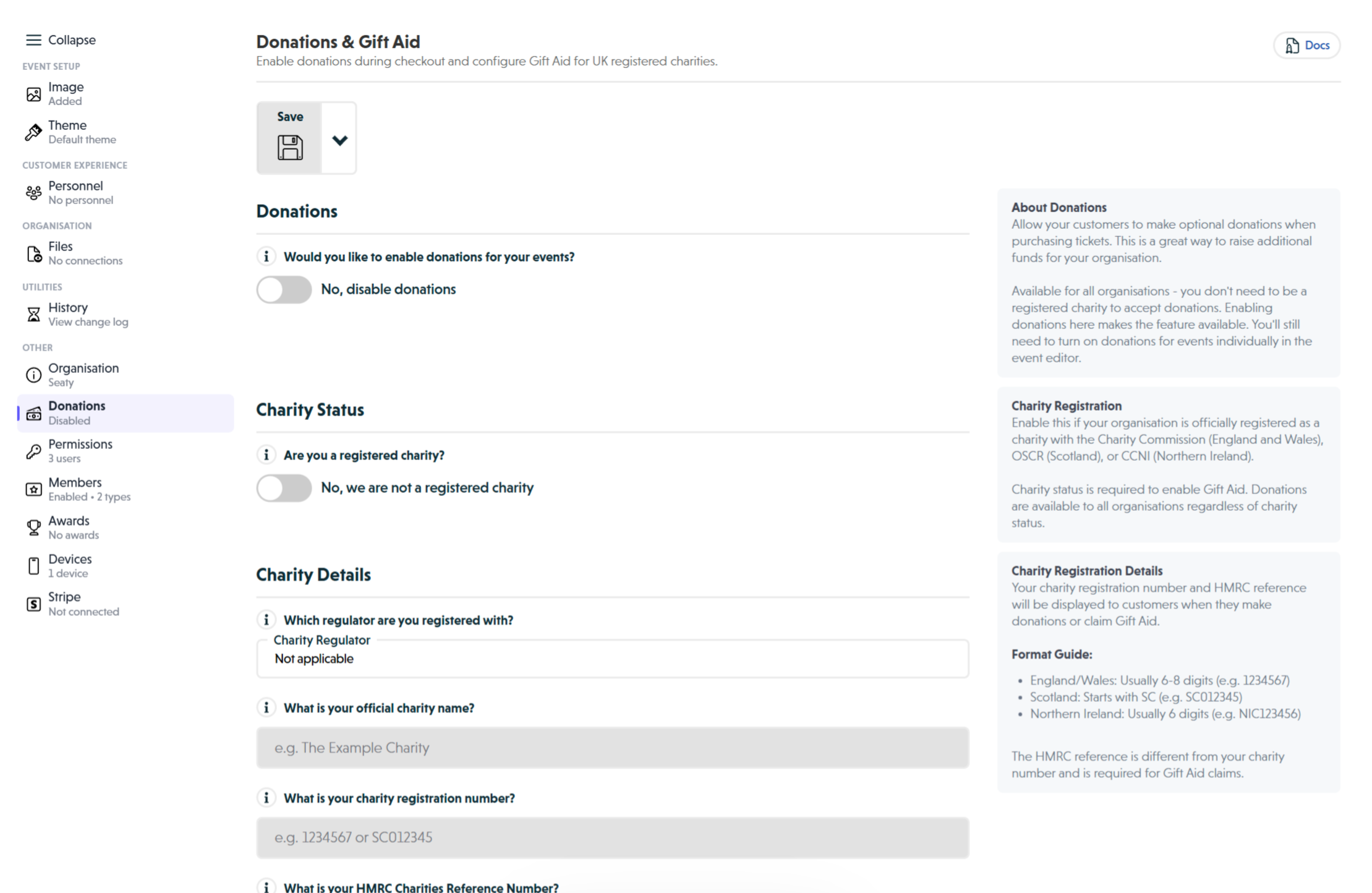 Donations section showing the donations toggle, charity status toggle, and charity details fields
How It Works
At a glance: Enable donations at organisation level, and customers see donation options during every online card payment checkout.
1. Enable donations for your organisation
In your organisation settings, turn on the donations option. This makes donations available across all your events that accept online card payments.
2. Customers see donation options at checkout
When purchasing tickets online with a card, customers reach a donation stage where they can choose from suggested amounts (None, or various pound amounts) or enter their own amount.
3. Gift Aid collection (for charities)
If you're a registered UK charity with the required details configured, customers who donate can also tick a Gift Aid box. They provide their name and UK address, and you can claim an extra 25% from HMRC at no cost to them.
4. Track donations in reports
Donations appear in your event summaries and financial reports. Gift Aid declarations are stored with full donor details for your HMRC claims.
Think of it this way:
- Organisation donations setting controls whether the donation stage appears at all
- Gift Aid is an optional add-on for registered charities only
- Payment method matters: donations only appear for online card payments, not cash or collect-at-box-office orders
Enabling Donations
To enable donations for your organisation:
- Navigate to Organisation Settings and find the Donations section
- Toggle "Would you like to enable donations for your events?" to Yes
- Click Save to apply changes
Once enabled, donations become available for online card payments across all your events. Customers will be presented with a donation stage during checkout where they can choose to add a donation to their order.
Note: Donations only appear during online card payment checkout. They are not available for cash, cheque, collect at box office, or manual payments.
When the donation stage appears, customers can choose from suggested amounts or enter a custom amount. They can also choose not to donate by selecting None.
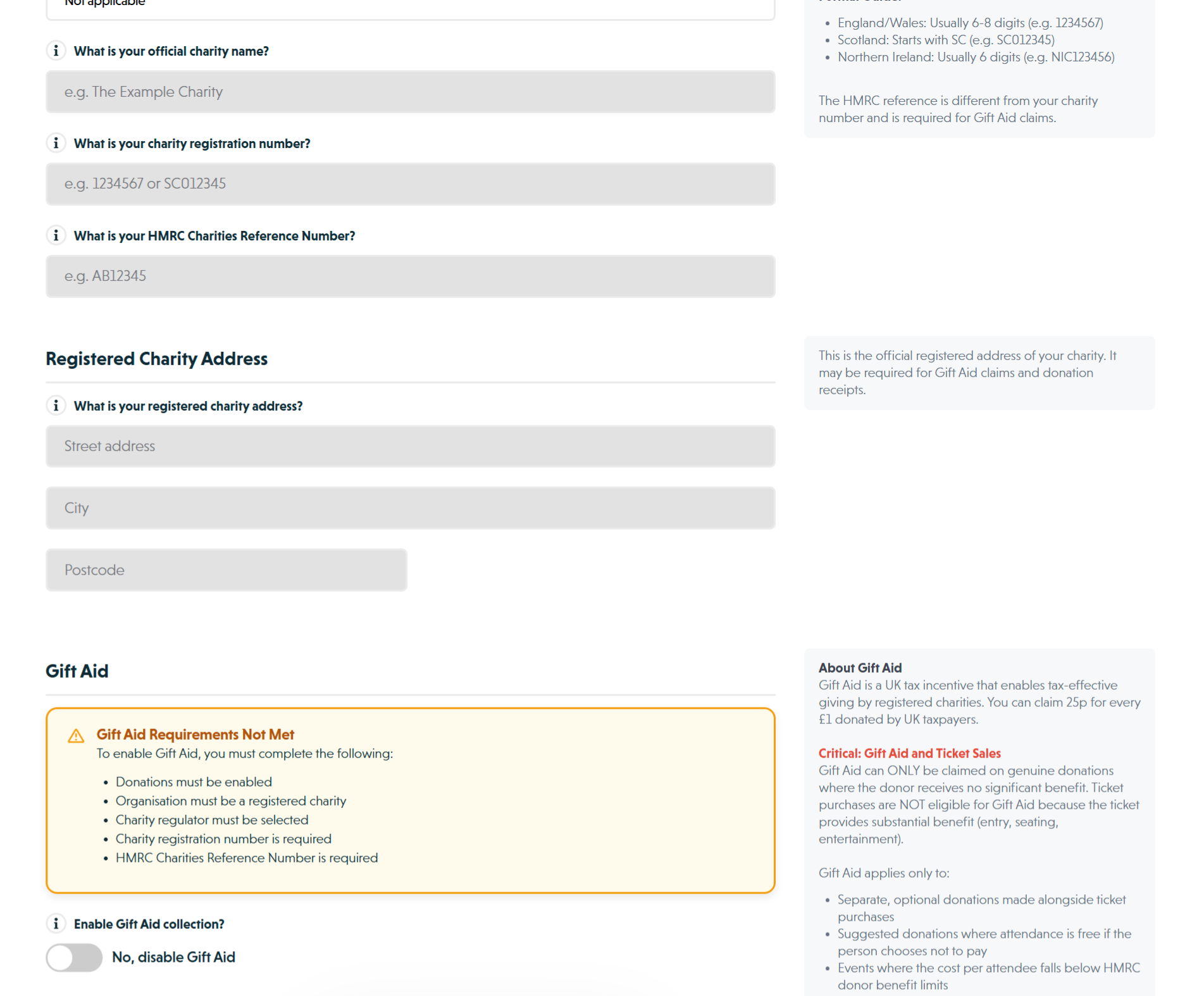 Gift Aid section showing requirements validation banner and Gift Aid toggle
Gift Aid for Registered Charities
Gift Aid is a UK tax scheme that allows registered charities to claim an extra 25p for every £1 donated by UK taxpayers. This increases the value of donations at no additional cost to the donor.
Requirements
Before you can enable Gift Aid, your organisation must meet these requirements:
-
Registered Charity Status - Your organisation must be registered with the Charity Commission for England and Wales, the Office of the Scottish Charity Regulator (OSCR), or the Charity Commission for Northern Ireland (CCNI)
-
Charity Registration Number - Your official charity number as issued by your regulator
-
HMRC Charities Reference Number - This is separate from your charity registration number and is required for Gift Aid claims
-
Donations Enabled - Donations must be enabled at organisation level first
All four requirements must be met before the Gift Aid toggle becomes active.
Configuring Charity Details
To enable Gift Aid:
-
Toggle "Are you a registered charity?" to Yes
-
Select your Charity Regulator from the dropdown
-
Enter your Charity Name as it appears on your registration documents
-
Enter your Charity Registration Number:
- England/Wales: Usually 6-8 digits (e.g. 1234567)
- Scotland: Starts with SC (e.g. SC012345)
- Northern Ireland: Usually 6 digits (e.g. NIC123456)
-
Enter your HMRC Charities Reference Number (e.g. AB12345)
-
Enter your Registered Charity Address (street address, city, postcode)
-
Toggle "Enable Gift Aid collection?" to Yes
-
Click Save to apply all changes
Gift Aid Compliance
Note: Gift Aid can only be claimed on genuine donations where the donor receives no significant benefit. Standard ticket purchases are not eligible for Gift Aid because the ticket provides substantial benefit (entry, seating, entertainment).
Gift Aid applies only to:
- Separate, optional donations made alongside ticket purchases
- Suggested donations where attendance is free if the person chooses not to pay
- Events where the cost per attendee falls below HMRC donor benefit limits
Most ticketed events (concerts, theatre performances, dinners) do not qualify because the value provided exceeds HMRC limits.
For the wider context (when Gift Aid does and doesn't apply to ticketed fundraisers, the "minimum donation" rule, charity registration thresholds, and how VAT interacts with charity ticketing), see our guide on selling tickets for UK charity events.
Why this matters: The donations feature is designed for optional donations during ticket purchase, not for claiming Gift Aid on ticket prices themselves. Ensure your usage complies with HMRC Gift Aid rules.
Your organisation must keep proper records for 6 years. Misuse of Gift Aid can result in HMRC penalties.
Customer Experience During Checkout
When a customer purchases tickets with donations enabled:
-
Ticket Selection - Customer selects their tickets as normal
-
Attendee Details - Customer provides their contact information
-
Donation Stage - Customer sees donation options with suggested amounts and a custom option, plus None for those who prefer not to donate
-
Gift Aid Option (if enabled and donation selected) - A checkbox appears asking if they want to add Gift Aid, showing how much extra the charity will receive
-
Gift Aid Declaration (if customer opts in) - Customer provides their full name, UK address, and confirms they are a UK taxpayer
-
Payment - Donation is included in the total payment amount
-
Confirmation - Order confirmation shows donation amount and Gift Aid status
Service Fees on Donations
If your organisation does not absorb service fees (i.e., customers pay fees), service fees will apply to donation amounts as they are part of the total payment transaction.
The donation stage displays this breakdown so customers understand the total they will pay.
Note: Donations are non-refundable. If your organisation offers Enhanced Refund Service, donations are not covered.
Tracking Donations
In Order Details
Each order with a donation shows the donation amount and whether Gift Aid was declared.
In Reports
Access donation information through your organisation's financial reports:
- Event Summary - Total donations raised per event
- Financial Reports - Separate donation line items
- Gift Aid Declarations - Full donor details for HMRC claim preparation
Note: You must keep Gift Aid records for 6 years. Export donation reports regularly and store them securely as part of your charity's financial records.
Common Questions
Enabling and Configuration
Can I enable donations for some events but not others?
Donations are enabled at the organisation level and appear for all online card payment orders. You cannot selectively enable donations per event. However, customers always have the option to choose None (no donation) during checkout.
Can I enable Gift Aid for some events but not others?
Gift Aid is configured at organisation level only and applies to all events when enabled. If you enable Gift Aid for your organisation, it will be available for all events that use donations.
Can I customise the donation amounts shown?
The suggested donation amounts are fixed. Customers can always choose the custom amount option to enter any value they wish, or select None for no donation.
Refunds and Administration
What happens if a customer refunds their order?
Donations are non-refundable by default. When processing refunds, the donation amount is not included in the refund calculation. The donation remains with your organisation even if the ticket portion is refunded.
Why is this the case? Donations are voluntary contributions separate from ticket purchases. Make this policy clear in your organisation's terms and conditions.
Can administrators take donations when creating manual orders?
Yes, if the administrator selects online card payment as the payment method, the donation stage appears during the order creation process, just as it does for customers.
Gift Aid Claims
How do I claim Gift Aid from HMRC?
The system stores all Gift Aid declarations and donor information. To claim:
- Export your donation data for your chosen period
- Filter for donations with Gift Aid declarations
- Use the donor details to complete HMRC's Gift Aid claim forms
- Submit your claim to HMRC according to their schedule
Consult with your charity's accountant or HMRC guidance for specific claim procedures.
What if a donor is not a UK taxpayer?
The Gift Aid declaration checkbox should only be selected by UK taxpayers. If a non-UK taxpayer incorrectly declares Gift Aid, it is the donor's responsibility to inform HMRC. Your organisation should not claim Gift Aid on ineligible donations.
Other Questions
Do donations count toward ticket sales limits or quotas?
No. Donations are separate from ticket inventory and do not affect ticket availability or quota calculations.
Can I see which events raised the most donations?
Yes. Use your organisation's reports to see all donations across events. You can filter by event to compare donation performance.
Best Practices
Communicating Donations to Customers
- Be clear that donations are voluntary
- Explain how donations support your organisation's mission
- If you're a charity, highlight the Gift Aid benefit to encourage participation
- Make your donation ask compelling but not pressuring
Gift Aid Compliance
- Only enable Gift Aid if you're a registered charity with HMRC recognition
- Ensure all required charity details are accurate and up to date
- Export donation reports regularly for your financial records
- Keep records for 6 years as required by HMRC
- Consult with your charity's accountant about Gift Aid claims
Setting Expectations
- Include donation policy in your terms and conditions
- Clarify that donations are non-refundable
- Explain that service fees may apply to donation amounts if not absorbed
- Be transparent about how donations are used
Maximising Donations
- Mention donation option in your event marketing
- Share success stories of how previous donations were used
- If Gift Aid enabled, emphasise that it costs donors nothing extra
- Thank donors in post-purchase communications